
In short
Remote service means handling your machines' issues remotely, with the machine data in front of you, before deciding whether a technician needs to be sent. Done well, it achieves three things:
- Many issues are resolved without travelling, by guiding the operator.
- The visits that are needed arrive with the diagnosis already done and the right part.
- The manufacturer can measure and show its service with KPIs: response time, issues resolved remotely and trips avoided.
It is the way of working we apply with ii40_Connect, our remote monitoring and remote service platform for machinery manufacturers.
What remote service is (and how it differs from remote access)
Many manufacturers already “do remote”: they have a router on the machine and, when the customer calls, they log into the operator panel screen to see what is going on. It is useful, but it is not remote service.
- Remote access: a door that opens when someone calls. You see the machine at that moment, but not what happened before, and nobody notifies you if something goes wrong.
- Remote service: the machine sends its data continuously. Important alarms notify your technician even if the customer hasn't called, and when you log in you see the history of what happened before the fault.
The difference shows in the diagnosis. With remote access you see the symptom. With remote service you see the sequence: which value started to move, when, and which alarms went off beforehand.
In practice, remote service doesn't depend on where the machine is. A machine installed on another continent can be followed from the company's headquarters, with no need to send a technician for days.
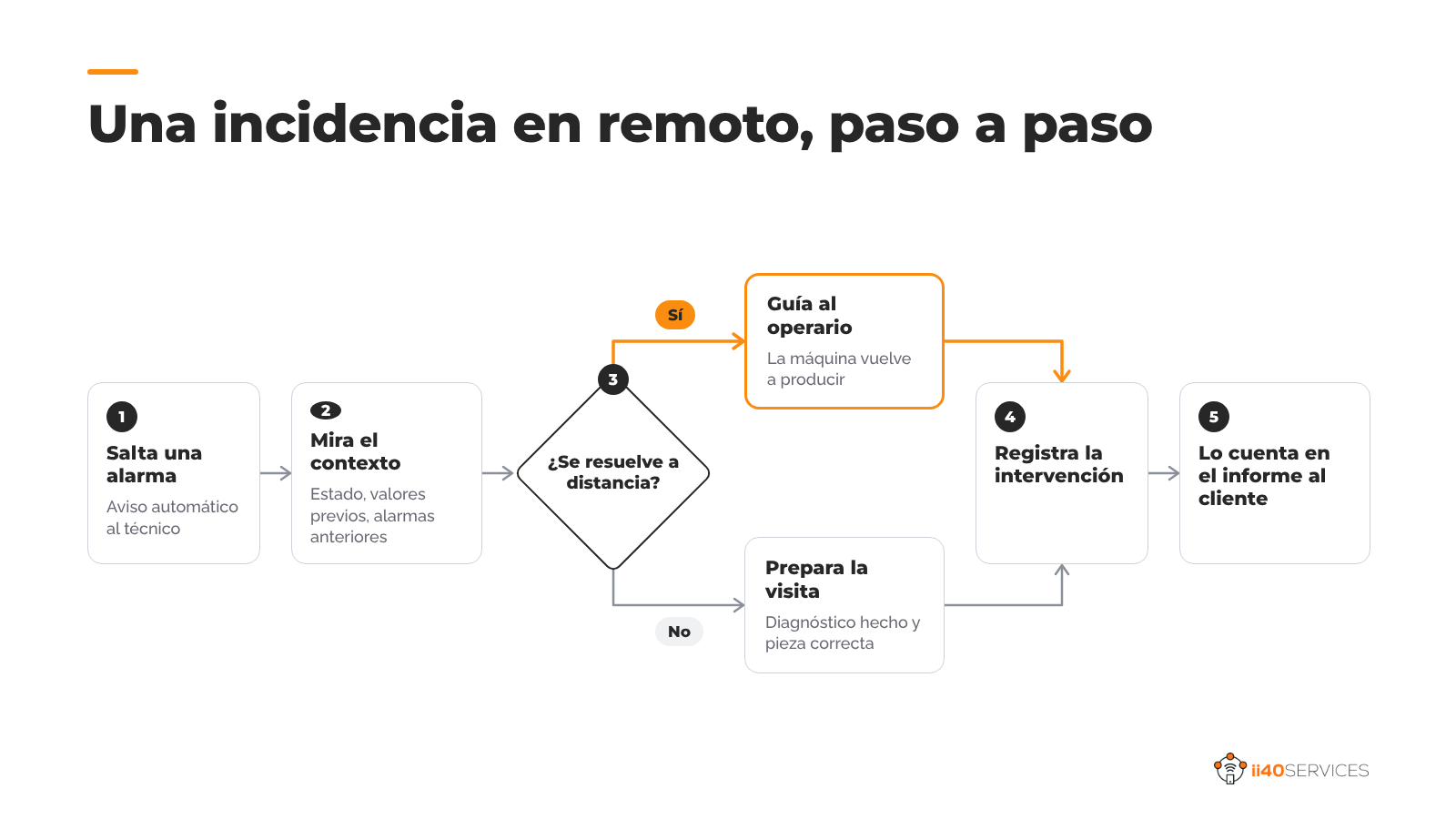
How an issue is resolved remotely, step by step
- An alarm goes off. The platform logs it with its timestamp and notifies the on-call person through the agreed channel: email, SMS or messaging.
- The technician looks at the context. Machine status, values of the key variables in the preceding minutes, and earlier alarms. In most cases this already points the diagnosis.
- They decide whether it can be resolved remotely. If it is an adjustment, a restart or an operating guideline, they call the operator and guide them. The machine is back to producing without waiting for anyone.
- If a visit is needed, they prepare it. The technician sets out with the diagnosis done, the right part and the time estimated. One visit instead of two.
- They log the intervention. What happened, what was done and which part was replaced are stored in that machine's history, for next time.
- They tell the customer what you've done. In the monthly report: how many issues, how many resolved without a site visit, and in how much time.
In ii40_Connect this whole path happens on the same screen: the alarm notification, the machine history and the intervention log stay together, so the next technician starts from what the previous one did.
The after-sales KPIs that prove it
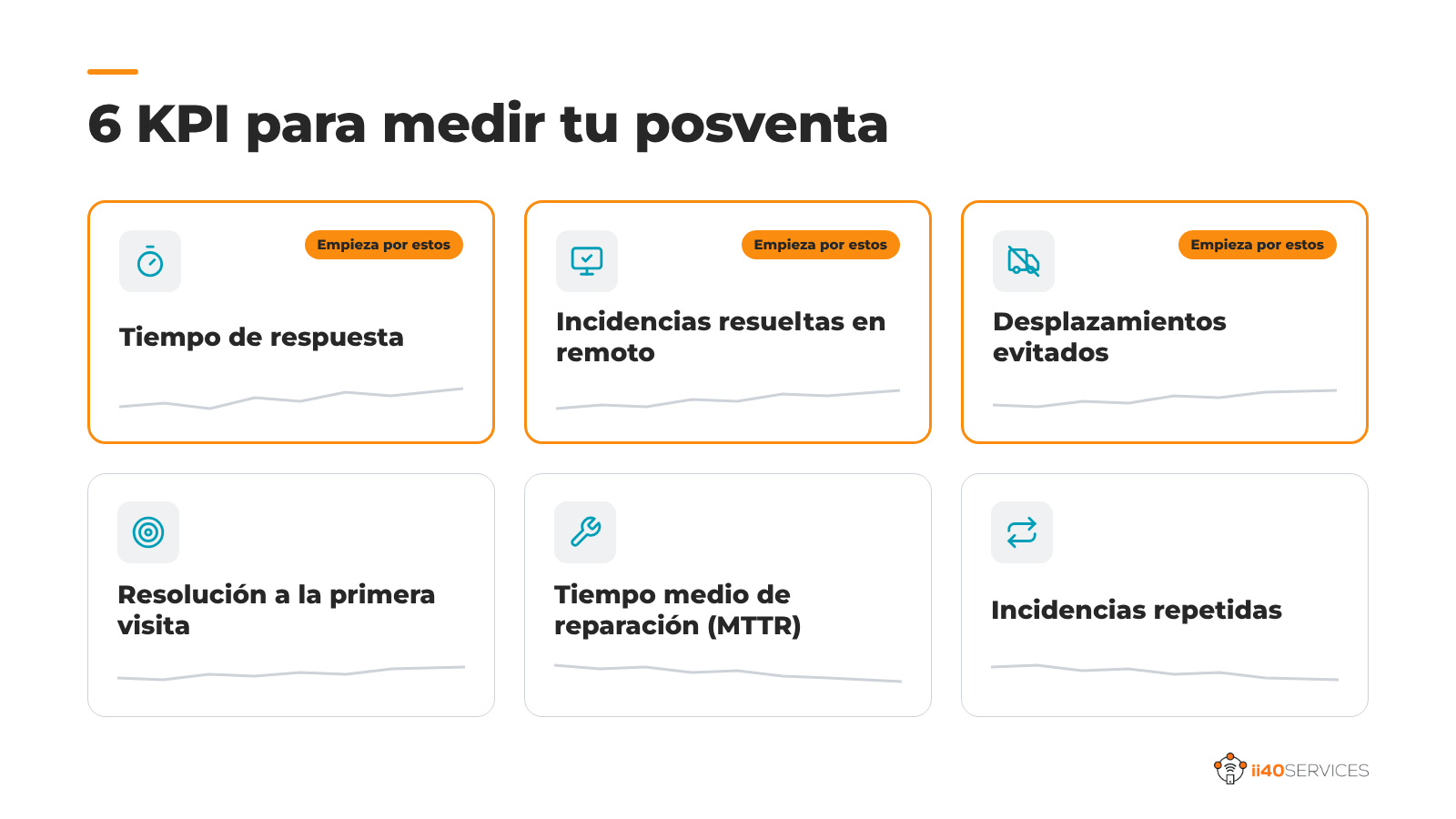
If it isn't measured, remote service looks like a favor you do the customer. These six indicators turn the service into something you can show, improve and charge for:
- Response time: how long it takes from the notification until someone starts diagnosing. It is the first commitment you can offer in a contract.
- Issues resolved remotely: what share of notifications was closed without sending anyone. It is the indicator that most clearly shows the value of remote service.
- Trips avoided: visits you didn't make thanks to remote work, with their cost in hours and kilometres. This one is for you: it tells you how much you save.
- First-visit resolution: of the visits you did make, how many solved the problem without a return. It goes up when the technician goes with the diagnosis done.
- Mean time to repair (MTTR): how long a stoppage lasts from the notification until the machine is producing again. It is what matters most to the customer.
- Repeat issues: alarms that come back on the same machine. They point to where a preventive visit or a design change is needed.
Start by measuring the first three from the first month. With two or three months of data you already have arguments for the first service contract.
How to get started
- Choose the machine family that generates the most emergencies for you. It is where the savings show up first and where the customer most appreciates the improvement.
- Define which alarms matter. Not all of them deserve a notification. Choose with your technician the ones that require action and leave the rest in the log.
- Decide who receives the notifications and during what hours. A notification that nobody receives is worse than having no notifications.
- Tell the customer. Let them know their machine is connected, what data leaves it and what they gain. It is the first step toward them paying for it later.
- Measure from day one. Response time, issues resolved remotely and trips avoided.
Frequently asked questions
What is industrial remote service?
It is the remote handling of a machine's issues by its manufacturer or its technical service, with continuous access to the machine's data and alarms, to diagnose and resolve without travelling whenever possible.
Is a remote access router enough to do remote service?
It is good for getting into the machine when the customer calls, but it doesn't store history or notify of alarms. For complete remote service you need a platform that collects data continuously.
Which KPIs should I use in machinery after-sales?
The most useful are response time, issues resolved remotely, trips avoided, first-visit resolution, mean time to repair (MTTR) and repeat issues.
What if the customer doesn't want to connect the machine to their network?
The gateway can have its own mobile connection, independent of the customer's network. Even so, it is a good idea to explain from the start what data leaves and how it is protected.
Which platform should I use for remote service of my machines?
It depends on your fleet and on what you want to offer. In How to choose a remote monitoring platform we review ten criteria and the alternatives on the market, including ii40_Connect.
What is ii40_Connect?
ii40_Connect is a remote monitoring and remote service platform for machinery manufacturers, developed by ii40 Services in Donostia-San Sebastián. It connects the machines installed at the manufacturer's customers, collects their operating data and turns it into services: remote support, performance reports (OEE) and the history of each machine.
How many trips could you save?
Tell us which machine generates the most emergencies for you and which PLC it uses. On a call we will look at what data can be read and what share of those issues you could handle remotely.
Keep reading:
- How to choose a remote monitoring platform for machinery manufacturers, ten criteria for choosing the right platform to service your installed base.
- OEE at the customer's plant: how to measure it and turn it into a service, how to measure the OEE of your machines at the customer's site and turn it into a service that pays.
- Machine history: documentation and interventions in one place, documentation, interventions and data for each machine in one place, for the manufacturer and the customer.
Article by the ii40Services team.